Leverage AI to Organize Your Business (Without the Overwhelm)
7 min read
You're more ready for this than you think
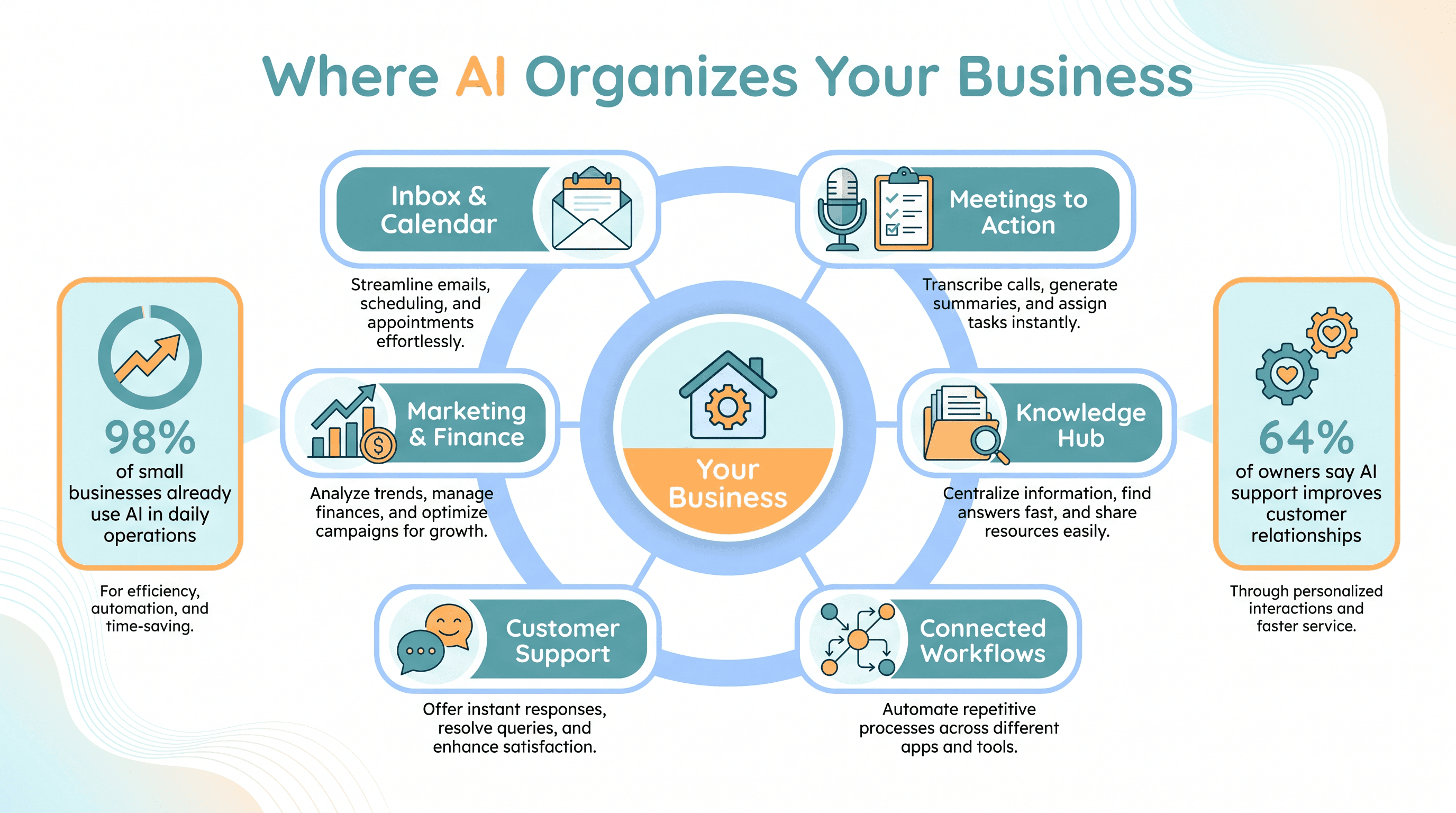
If "AI" sounds like something reserved for big companies with big budgets, here's a number that might surprise you. According to the U.S. Chamber of Commerce, 98% of small businesses already use AI in their day-to-day operations, and 91% believe AI tools will help them reach their growth goals (reported by HubSpot, 2024).
In other words, the question isn't really if you'll use AI. It's whether you'll use it on purpose—to bring order to the messy parts of running your business.
The U.S. Small Business Administration (SBA) puts it plainly: AI can help small businesses save time, cut costs, and stay competitive during periods of inflation by improving efficiency and reducing manual work. That's not hype. That's getting your evenings back.
This post isn't about replacing your team or chasing the latest shiny tool. It's about using AI to organize four things every business runs on: your tasks, your information, your communication, and your decisions.
Stop letting your inbox run your day
Email and calendar chaos drain more energy than almost anything else. You open your inbox to answer one thing, look up, and an hour is gone.
AI can turn that mess into a manageable flow. Google recommends using Google Workspace with Gemini to organize receipts, clear out your inbox, automate repetitive email tasks, and offload high-volume work so you can focus on what actually matters.
In practice, AI email tools can:
- Classify and route messages automatically—support here, sales there, admin over there
- Draft replies based on your past responses or simple templates
- Flag emails that need follow-up and set reminders so nothing slips
Think about your last week. How many times did you forget to follow up on a quote, or rewrite the same "thanks for reaching out" email from scratch? An AI-assisted inbox handles that quietly in the background, so your email becomes a workflow instead of a pile.
Turn meetings and notes into action, not lost decisions
Here's a pain almost every owner knows: you have a great client call, agree on next steps, and a week later nobody can remember who was supposed to do what.
AI fixes this surprisingly well. The SBA highlights that AI can record and summarize team meetings, then turn those notes into reusable templates and action lists.
Tools like Otter.ai act as a meeting assistant—automatically transcribing your discussions, summarizing the key points, and outlining an action plan while you stay focused on the conversation.
Here's how it looks in real life:
- You record a client call with Otter.ai. It produces a clean summary and a list of next steps.
- Those notes land in a tool like Notion, where built-in AI can summarize a client's full history or suggest next steps using everything from past meetings.
The result: unstructured conversations become searchable, organized information with clear tasks attached. Decisions stop disappearing, and follow-through stops depending on memory.
Build a single home for your knowledge
One of the biggest hidden costs in a small business is knowledge fragmentation—important stuff scattered across email, Google Drive, chat threads, and someone's desktop. When a question comes up, you go hunting.
AI is now built directly into the tools that fix this:
- Notion + NotionAI centralizes your documents, tasks, and notes. The AI can summarize meeting notes, turn bullet points into a polished document, translate content, and answer questions about anything in your workspace.
- Claude Co-work offers team workspaces with separate "Projects" for sales, support, or operations. You can upload PDFs, contracts, and reports into each one, creating organized, context-rich spaces your team can actually reference.
- ClickUp markets itself as an "everything app for work," combining project management, docs, and task tracking in one place to cut down on tool sprawl.
The theme here is consolidation. Instead of five half-used apps, you get one organized home where information is easy to find—and an AI assistant that helps you find it.
Connect your tools so work flows on its own
A lot of "organization" is really just moving information from one place to another. New lead comes in, so you copy it into a spreadsheet, then send a note to your team, then add a task. That's busywork begging to be automated.
Zapier connects your apps and automates these handoffs, and its newer AI layer lets you describe what you want in plain English. For example: "When I get a new lead in HubSpot, summarize their LinkedIn profile and send me a Slack message." Done—no manual copying, no missed handoffs.
A simple onboarding flow might look like this:
- A new lead lands in your CRM.
- AI summarizes their background and posts it to your sales channel.
- Their documents and that summary get stored in Notion, organized and searchable for later.
For HR and IT busywork, platforms like Rippling use AI to automate workflows and sync data across systems, sparing small teams a mountain of admin. The point isn't to automate everything overnight—it's to find the three or four handoffs you do constantly and let software carry them.
Keep customer communication consistent and tracked
When you're busy, customer messages can pile up or get answered inconsistently. AI helps you stay responsive without hiring a big team.
The SBA suggests adding website chatbots to answer common questions or complete orders, automating phone service to route calls to the right place, and even using AI to write courteous responses to online reviews.
Tools like Tidio and LiveChat let you set up automated agents that greet visitors, answer FAQs, and guide people through checkout. Platforms like Dialpad combine calls, messaging, and meetings in one workspace, using AI to transcribe conversations and surface common issues.
And customers notice. A Forbes study (cited by Rippling) found that 64% of business owners believe AI-powered customer support improves relationships with their business. Beyond faster replies, you get something valuable: every interaction tracked in one place, so patterns in customer questions become insights you can act on.
Bring order to marketing and money
Two areas where disorganization quietly costs you: inconsistent marketing and messy finances.
On the marketing side, AI keeps you consistent instead of scrambling. HubSpot's AI companion, Breeze, helps with content creation, cleans up duplicate lists and workflows, and offers recommendations across sales, marketing, and support. Mailchimp's generative AI helps write and optimize email campaigns matched to specific audience segments, while Sprout Social uses AI to surface trends and help you draft effective posts. Together, these turn ad-hoc "I should post something" energy into an organized, repeatable calendar.
On the finance side, AI-enabled accounting tools take real weight off your shoulders. Sage now automates invoicing and payments and offers bookkeeping advice in plain language. Xero launched a budget-friendly plan for small businesses and freelancers that simplifies bookkeeping and financial tracking. The SBA also notes AI can analyze your business data to spot patterns and highlight gaps or advantages compared to similar businesses—so your numbers stay current and actually tell you something.
A few honest cautions
AI is powerful, but it works best with a steady hand on the wheel. The SBA encourages owners to understand both the benefits and the risks. A few things to keep in mind:
- Data quality matters. AI is only as good as the information you feed it. Messy underlying data can lead to misleading summaries, so it's worth getting your systems tidy before you fully trust the output.
- Keep humans in the loop. AI can handle repeat tasks beautifully, but you'll still want to review critical communications and final decisions—especially anything involving money or compliance.
- Introduce change gradually. Bolting on five AI tools at once can create a new kind of chaos. Pick one or two real problems, set up the workflow, train your team, then build from there.
Used thoughtfully, AI doesn't just make you faster. It organizes your tasks, your information, and your decisions into systems a small team can actually run—so the business depends less on your memory and more on a structure that holds.